Crisis communication resources to help you protect your revenue, reputation, and brand.
Effective crisis communications when “it” hits the fan.

Our blog is filled with deep resources to help with your crisis communication needs. Whether you are writing a crisis communication plan, seeking the best media training tips, or digging for case studies on crisis situations, you’ll find it here. Our goal is to give you all of the public relations resources you need to protect your revenue, reputation, and brand.
For those of you who love DIY and taking on a challenge, we’ve worked really hard to give you a good road map to follow. However, sometimes the fastest option is to bring in a pro. If that’s the case, we’re fully vaccinated and we’re ready to meet your needs, anywhere and anytime.
If you need help with your crisis communications plan, we’re ready to help.
When you need media training for your spokespeople, give us a call.
Anytime your organization needs a great keynote for your conference, we’d value the opportunity to serve you.
We invite you to:
By Gerard Braud —
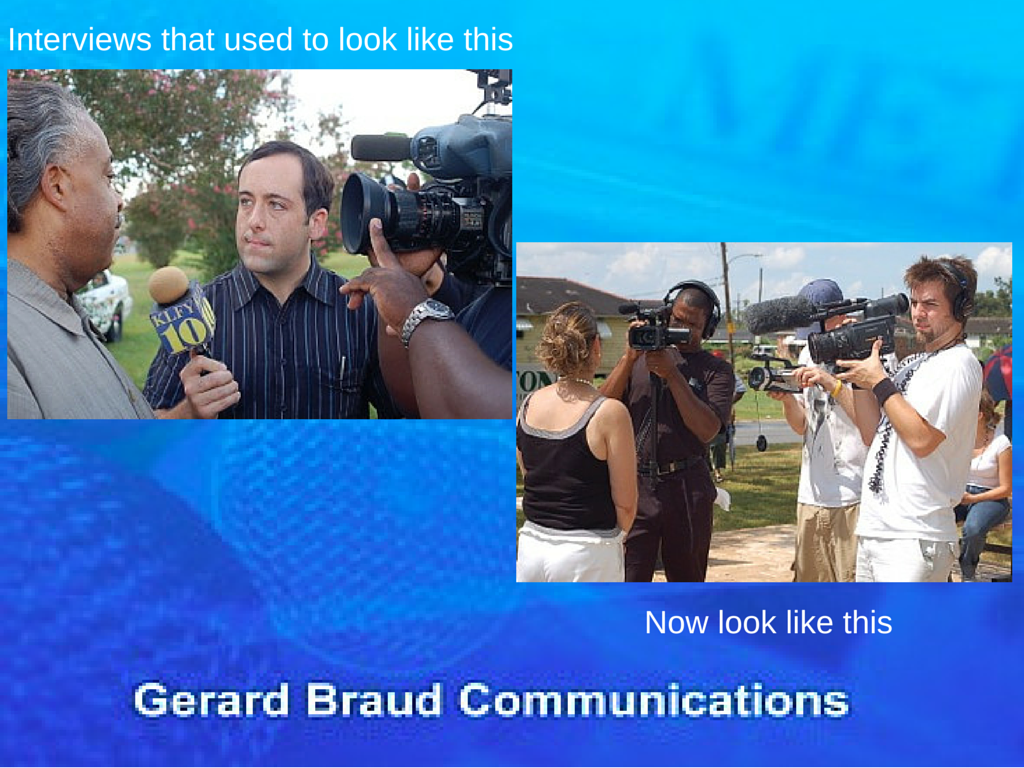 As social media and smart phones expand their reach, we are seeing a seismic shift that is sending tremors through the mainstream media landscape. This is creating both new challenges, as well as new opportunities for media spokespeople. Capitalizing on the opportunities requires you to adopt new approaches, learn new skills and be open to new realities.
If you are bold enough and brave enough to try something drastically new, then I’d love to meet you at the upcoming World Conference for the International Association of Business Communications in San Francisco. I’ve prepared an all-new special presentation for Monday, June 15 from 10:30 a.m. – 12:30 p.m. in the Club Room. It only seats 100 people, so make plans to get their early.
This is not a lecture or a class but a do-and-learn workshop. You should come ready to write in the first hour, as well as to discuss the challenges you and/or your spokespeople have faced in previous media training classes or in previous interviews. If there is a problem, the first hour is dedicated to solving those problems so they never happen again. In fact, I’m ready for you to contact me outlining problems you’ve faced that you’d like to solve. Send an e-mail to me at gerard@braudcommunications.com with the subject line IABC Question.
Our focus in the first hour will include:
In the second hour you will be up on your feet unlocking the futuristic power of your smartphone, learning how to do remote interviews. Please make sure to bring either your smartphone or your iPad.
While many spokespeople complain about how the media operate, the reality is that you can learn to be an expert every time either you or an executive within your business speaks to the media.
Social media is one of the biggest trends changing the media. Free content is competing with professional content. The reality is news stories are being told by eyewitnesses with a smartphone faster than the story can be told by the mainstream media and faster than a corporation might be willing to tell the story of their own crisis.
As social media grabs more of the media’s audience, the media are watching their profits disappear. That means there are fewer reporters and photographers employed to tell your corporate story in good times and in times of crisis.
Where problems exist in the media we hope you see opportunities.
The greatest opportunity for someone who is a professional business communicator or public relations expert is, on one hand, to improve your own interview skills, and at the same time, learn new skills for doing interviews and creating videos that are as good as or better than the ones being supplied by eyewitnesses.
If you crave a chance to walk away with new skills that you can immediately use as soon as you are back at work, I look forward to meeting you at this workshop.
Tutorial #4 By Gerard Braud, CNN iReporter Evangelist —
Creating and filming your own CNN iReports or smartphone videos is a useful tool for communicating with the media, your employees, your customers, and key stakeholders in your crisis. Not only is it a useful tool during hurricane season, but it is useful during any crisis or natural disaster. However, if you plan to do these videos, it is important to understand what the media consider newsworthy. Often, what you consider newsworthy and what the media consider newsworthy are two different things.

Click here to watch video
For the 15 years that I worked as a reporter in print, radio and mostly television, people questioned me daily about why certain things got in the newspaper or on the air, and why other things did not.
News is traditionally defined as what is new, unique or different. Also, acts that tend to be violent, explosive and bloody often dominate the news, hence the old expression, “If it bleeds it leads,” as in, it leads off the newscast.
News and the decisions about what gets into a newspaper or broadcast on the news, is further based on “who cares?” If it is something people will talk about, i.e., they care, it is more likely to be considered news worthy.
Watch today’s video tutorial to learn more.
What is considered news worthy and what gets on television today is far different than what was considered news worthy 10-15 years ago. News programs and news networks have shifted more toward what I would consider as “info-tainment.” Information and entertainment is blended together and sometimes it is difficult to separate them, or determine where one ends and the other begins.
A loud mouth television or radio commentator often shouts out an opinion in an entertaining way to a significant segment of the audience and produces a large amount of advertising revenue. This, in my opinion not only represents bias in the media, but is also the blurry line that bleeds from news into info-tainment.
Social media has also impacted news coverage and what gets reported. News was once defined as information designed to inform the electorate, so we could understand public issues and elect good leaders. However, today, more people care about — and the media is more likely to report on — the popularity of a viral video on the internet.
For your purpose, as a public relations professional, spokesperson or Public Information Officer (PIO), if a news worthy event happens where you work, your gut and experience tells you that a certain event is news worthy. What you must decide is whether you will be an active participant in providing official information to the media, or whether you will remain silent and allow the narrative to be told by the citizen on the street, armed with a cell phone.
My hope is that these tutorials encourage you to not only participate, but to also become an iReporter for CNN.
This link will take you to my tutorials on the CNN iReporter website. I hope you take the time to view, study, and share all 23 videos and articles.
This link will take you to the index for all of the articles and videos.
If you, like many others, think this information would be valuable as a workshop at a conference or corporate meeting, please call me at 985-624-9976. You can also download a PDF that outlines the program, Social Media iReports.pdf, so you can share it with your meeting planner or training manager.
Tutorial #3 CNN iReporter Evangelist Gerard Braud
Everyday in June I will be sharing tutorials for effective crisis communications during hurricane season. The lessons apply to tornadoes, floods, blizzards, and other natural disasters. The future of crisis communications is in video, particularly CNN iReports, which allow organizations to tell the story of their crisis to their customers, audiences and key stakeholders, rather than speculating eyewitnesses. When speculating eyewitnesses videotape your crisis on their smartphones and it gets shared across local or even national media, your organizations reputation and revenue suffer.

Click image to watch video
CNN iReports should be added to the crisis communications, media relations and social media tool kit of every corporation, government agency, and non-profit organization in the world. Should your organization experience a significant crisis that gets significant media coverage, iReports are your direct path to adding perspective and official information about your breaking news story.
Just as most of you have established an account at Facebook, YouTube and Twitter, you should have an account pre-established at www.cnn.com/ireport so it is ready to use if you need it. Unlike other social media sites, you will use this one less often.
The set up process is fast and simple. If you have created any online profile in the past you can figure it out and complete the task in 5-10 minutes.
Some leaders and executives may question whether the company needs an iReport account. My philosophy is that if you experience a newsworthy crisis, you have two options. You can either have your story told by an unofficial eyewitness on the street that has an iReport account or you can provide better video, more factual details, and dispel rumors.
Shortly after your video is filed, a team of CNN iReport producers will watch your video. if they like it, they label it as vetted by CNN. The link is then shared with producers for the various CNN news programs. If those producers like it, they may place all or part of the video on the air in their news program. If your video proves that you have great visuals, a compelling perspective and compelling information, expect to get a phone call from CNN producers, asking you to do a live report via Skype, using your computer, smart phone or tablet.
You will learn more about how to properly produce a newsworthy CNN iReport in an upcoming article. But before we go into depth on that, your assignment is to set up your official account right now.
This link will take you to my tutorials on the CNN iReporter website. I hope you take the time to view, study, and share all 23 videos and articles.
This link will take you to the index for all of the articles and videos.
If you, like many others, think this information would be valuable as a workshop at a conference or corporate meeting, please call me at 985-624-9976. You can also download a PDF that outlines the program, Social Media iReports.pdf, so you can share it with your meeting planner or training manager.
Tutorial #2 by Gerard Braud, iReporter Evangelist
With hurricane season upon us, and other violent weather such as floods, hail, and tornadoes hitting much of the United States this time of year, we are focusing on how to effectively use video to communicate in a crisis. Today’s lesson stems from what we learned eight years ago about the power of video, especially when it is uploaded directly to CNN as an iReport.

Click image to watch video
Think back to April 16, 2007, the day of the Virginia Tech massacre. Thirty-two people were murdered. The image that may stand out the most for you would have been a cell phone videos, shot by a student, capturing the sounds of gunshots.
The student shot the video, then uploaded it as a CNN iReport.
This was the moment, for me, that the world of news coverage and crisis communications changed.
You can watch today’s tutorial video to learn more.
I’ve worn and still do, wear many hats. My primary job is as a crisis communications expert, teaching organizations how to effectively communicate with the media, their employees and other key audiences during a crisis. I also worked for 15 years as a full-time journalist. And occasionally, I’m a citizen journalist, filing CNN iReports.
From a crisis communications standpoint, Virginia Tech failed to effectively communicate with the media, their students, their faculty, and many other audiences on the day of their massacre.
Furthermore, had they communicated properly and evacuated the campus in a timely manner, that student would have not been on campus with his cellphone, and therefore would not have captured that video, and therefore would not have been able to sent it to CNN, and therefore the media would never have had the video.
At the same time, had the university’s own public relations team been aware of the power of a CNN iReport, they could have actually provided their own statement directly to CNN by filing an iReport.
This entire sequence of events was a game changer. It signified to all public relations people, to all spokespeople, and to all Public Information Officers, that someone is going to tell your story. It can either be you, as a professional with official and accurate information, or the story will be told by an eyewitness with a smart phone.
Yet here we are in 2013, six years later, and I’d be willing to be the vast majority of public relations people and Public Information Officers (PIO) have never given it a second thought. I’d bet most people do not have an idea how to do this? I know this to be true because when I suggest it in the workshops I teach, a portion of the class is amazed that they’ve never thought of it. Another portion can only make up reasons as to why they think their boss will reject the idea, admitting that they do not have the tenacity to stand up to the boss and make a strong, legitimate case for why web videos need to be an important part of their crisis communication and media relations plan.
Who do you want telling your story during your crisis?
This link will take you to my tutorials on the CNN iReporter website. I hope you take the time to view, study, and share all 23 videos and articles.
This link will take you to the index for all of the articles and videos.
If you, like many others, think this information would be valuable as a workshop at a conference or corporate meeting, please call me at 985-624-9976. You can also download a PDF of the program description: Social Media iReports.pdf, so you can share it with your meeting planner or training manager.
By Gerard Braud —

Click here to watch video
The future of crisis and emergency communications in hurricanes, natural disasters and other weather related events, is in creating CNN iReports. It is a brilliant way to add to your crisis communications and media relations strategy. This strategy is perfect for public information officers (PIOs), emergency managers, and any corporate communications experts. Best of all, what you do for your iReport can be re-purposed and posted to YouTube, shared with The Weather Channel, and in many cases, uploaded through links with your local media outlets.
I started pioneering these reports as an experiment during Tropical Storm Lee in 2011 and then took it up a notch during Hurricane Isaac in 2012. You can do what I have done, provided you are willing to train and practice before the event is upon you. Since many of you will never have the chance to attend one of the live training sessions I teach at emergency management and public relations conferences, I thought you might benefit from this online tutorial.
I’ve created 23 online videos with associated articles on how and why you should be a CNN iReporter. When your organization faces a major crisis or news event that gets significant attention from your local news media, and has the ability be get national news attention, these will be useful.
I have extensive experience as an iReporter. In 2013, CNN selected me as one of their top iReporters, out of more than 11,000 reporters, for my in-depth coverage of Hurricane Isaac near New Orleans on August 28, 2012.
Most iReports are eyewitness accounts of events. They are filed by the average person on the street who sends photos, video and narration directly to CNN, in the very same way that they can send videos to YouTube. What you will learn in these 23 lessons also applies to placing videos on YouTube, FaceBook, Twitter and your official website.
Who would you rather have posting photos, videos and narration? Should it be someone speculating about what they see? Would it be better if it came from an official source, with real knowledge of the event? Shouldn’t the media have official information from someone like you?
A CNN iReport is a direct path to one of the world’s premier news networks.
This link will take you to my tutorials on the CNN iReporter website. I hope you take the time to view, study, and share all 23 videos and articles.
This link will take you to the index for all of the articles and videos.
If you, like many others, think this information would be valuable as a workshop at a conference or corporate meeting, please call me at 985-624-9976. You can also download a PDF with a description of the program: Social Media iReports.pdf, so you can share it with your meeting planner or training manager.
 By Gerard Braud –
The worst sentence to begin a news release is, “We are excited to announce…”
If you hire a so-called public relations expert to write your news release and they write this, you should fire them. If you have written this yourself because you’ve seen others do the same thing, please stop.
Nothing says you value yourself more than your audience or customers than the dreaded, “We are excited” sentence.
In the world of customer satisfaction, your goal should be to celebrate the joy and benefits that you bring to your customers.
Here are 4 tips to avoid the worst sentence in the world:
1. Stop writing it.
2. Begin your news release with a customer-focused sentence, such as, “If you need XYZ, your life is about to get easier because of a new product/gadget being introduced today.”
3. Measure your “I”/”we”/”you”/”them” use. Your news release should contain more sentences that focus on the customer than the company.
4. Measure your “how” to “why” use. Stop focusing on how your product works and focus on why it improves the lives of your customers.
There is no doubt that the internal decision makers are excited. But the key to better sales is to make the consumer excited. When the customer gets excited they buy. When they buy then you can really get excited.