Posts

Tutorial #17 Using Skype as Part of Your Crisis Communications Plan

Tutorial #17 by Gerard Braud —

Click image to watch video

Click image to watch video

As more media outlets cut back on the size of their news staff, they are seeking more videos provided by eyewitnesses or experts. This is where you come in… and this creates a huge opportunity for you. I am publishing this series of tutorials to show corporate spokespeople, public information officers (PIOs), emergency managers and public relations professionals that uploading your own videos to the web during your crisis needs to be a part of your crisis communications strategy.  The ultimate goal is for a major media outlet, such as CNN, to view your video and reach out to you to seek your official information.

These days, they will likely ask you to be interviewed via Skype.

If you are unfamiliar with Skype, visit www.skype.com and download the free application for you computer, smart phone and smart tablet.

The app allows you to make regular phone calls to regular telephone numbers, or it allows you to make a call from computer to computer with voice only, or you can set up a video chat from computer to computer.

CNN and the other news outlets want you to know how to set up the video chat.

Start by downloading the app. Next, set up your profile. Much like most social media sites, you can add your contact information and a photo.

CNN producers will then either call you or ask you to call them at an assigned time, during the news program. When it is time to go live, your Skype call is what the audience at home will see.

Take a look at this specific video tutorial to learn more.

The quality of the image on Skype varies, based on the strength of your internet signal. Sometimes the image may freeze while you are live on the air. Sometimes the call will get dropped completely.

The networks know they are taking a risk when they do a Skype call, but if your location and event is news worthy and they have no news crew of their own nearby, they are willing to take the risk.

In one of my previous tutorials I mentioned that a set of ear buds or a USB headset can be useful during your live report. If you use these, you will need to find the audio button on the Skype software and select input and output for the headsets, rather than using the computer or smart device’s external speakers and microphone.

The secret to getting it right is to practice on a clear sunny day, rather than attempting to learn the hard way under the time constraints of a crisis and significant news event. Set up your account, study the account until you know all of the buttons you need to push, then establish a call between you and a colleague so you can practice.

During your practice, you’ll want to incorporate many of the other lessons you’ve learned through these tutorials, including managing audio, lighting and movement, as well as what to say.

This link will take you to my tutorials on the CNN iReporter website. I hope you take the time to view, study, and share all 23 videos and articles.

This link will take you to the index for all of the articles and videos.

If you, like many others, think this information would be valuable as a workshop at a conference or corporate meeting, please call me at 985-624-9976. You can also download a PDF that outlines the program,Social Media iReports.pdf so you can share it with your meeting planner or training manager.


Tutorial #16 How to Add Simple Yet Effective Movement to Your Web Video

Tutorial #16 By Gerard Braud

If you decide to file a web video as part of your crisis communications or media relations strategy, you can speak directly to the media about your crisis. Not only can the media access it and view it, but so will your audiences such as customers and employees. Now that we have mastered, sound and lighting,  you can focus on increasing the number of people who view your video by adding some simple movement to your video.

Click image to watch video

Click image to watch video

Think about your own web video viewing habits. If a video is entertaining you watch it. If a video is boring, you click to something else.

In some CNN iReports, the entire report is filled with just video of a breaking news story. Other times, a person is on camera talking, which is generally what I do in most of my CNN iReports. I’m usually on location, recreating the same type of Live Shot that I did when I was a television reporter.

Sometimes  movement can be as simple as turning the camera on your smart device to the left or right. Sometimes, you can walk and talk as you go. In some of my reports I do both, and even stop to bend down and pick up items I may be referencing in my verbal narration.

Watch today’s video tutorial to learn more.

As you add movement, it needs to have purpose. Show us something interesting as you move. Let the audience see things from your point of view — television producers call this POV, i.e. point of view.

As you move, be aware of what is behind you. You don’t want to accidentally show something that would be embarrassing.

To effectively master this skill, you need to practice in advance. So take a few minutes to first watch my video tutorial on this topic, then use your own smart phone or tablet to record a video in which you move left or right or walk. Practice it on a clear sunny day, so you’ll be prepared on the day you need it.

This link will take you to all of my tutorials on the CNN iReporter website. I hope you take the time to view, study, and share all 23 videos and articles.

This link will take you to the index for all of the articles and videos.

If you, like many others, think this information would be valuable as a workshop at a conference or corporate meeting, please call me at 985-624-9976. You can also download a PDF that outlines the program, Social Media iReports.pdf, so you can share it with your meeting planner or training manager.


Tutorial #13 How to Get Good Audio for Your Crisis Communications Videos

Tutorial #13 By Gerard Braud

Tutorial 13 Still Gerard Braud

Creating smartphone or iPad videos for effective crisis communications is something that is not being done by enough Public Information Officers (PIO), Emergency Managers, government officials or corporate spokespeople. Quite possibly, these groups of people are not creating videos because they have not been trained in doing so.  This series of 23 tutorials shows you some of the basic elements of creating your own selfie videos, as well as some of the more difficult elements, such as lighting and sound. These factors are a critical part of creating a professional looking and sounding video so that you can communicate effectively to your audiences in your crisis.

Have you ever watched a video you’ve shot, only to be surprised that you can hear other people talking in the background, or that the roar of the wind drowns out what you were saying or wanted to hear?

When shooting a video for a CNN iReport, for YouTube, or for any other use, you must be a multi-tasking expert. As you talk while recording the video, you must be listening as well.

Are dogs barking in the background? Are church bells ringing? Is someone nearby talking loudly on a cell phone? And the big one, is the wind blowing so hard that it drowns out your voice narration?

View today’s video tutorial to see and hear examples of all of the above.

As you’ll see in the tutorial, you have several options, including your ability to turn your back to the wind or face the wind, if wind is your problem. The correct answer depends upon where the microphone is located on your device. Another option is to use a small microphone that plugs into the headphone jack of your smart phone or tablet.

This link will take you to my tutorials on the CNN iReporter website. I hope you take the time to view, study, and share all 23 videos and articles.

This link will take you to the index for all of the articles and videos.

If you, like many others, think this information would be valuable as a workshop at a conference or corporate meeting, please call me at 985-624-9976. You can also download a PDF that outlines the program,Social Media iReports.pdf so you can share it with your meeting planner or training manager.


Tutorial #12: How to Create Proper Lighting When Creating Videos on Your Smartphone

Tutorial # 12 By Gerard Braud

Public relations professionals, emergency managers, corporate spokespeople and public information officers (PIO) need to create quality smartphone videos to communicate with their audiences effectively during their crises. Among many elements to consider when creating your own smartphone video, lighting is another tricky, but crucial one. After viewing this tutorial, make sure to practice this skill on a clear sunny day in advance of your crisis or newsworthy event, so when your darkest day comes, you have it perfected.

Tutorial 12 Still Gerard Braud

Professional photographers know how to adjust the iris on the lens of their expensive cameras. But when you take a video with your smart phone or tablet, you become a slave to the automatic iris on the device’s built in camera.

The only control you have is based on what you are shooting.

If you are appearing in your video, as I do in many of my CNN iReports, your goal is to have good flesh tones. The brighter the objects behind you, the darker your flesh tones will be. The darker the objects behind you, the brighter and more natural your flesh tones will be.

If you like to move while shooting your videos, you have to constantly be aware of what happens to the iris on the device as you move. While you are looking at the camera lens for your report, you must be looking out of the corner of your eye to have a sense for what the image looks like on your screen.

Persons with dark skin have an even harder time managing their skin tones on video.

View the tutorial video to see exactly what I’m talking about.


This link will take you to my tutorials on the CNN iReports website. I hope you take the time to view, study, and share all 23 videos and articles.

This link will take you to the index for all of the articles and videos.

If you, like many others, think this information would be valuable as a workshop at a conference or corporate meeting, please call me at 985-624-9976. You can also download a PDF that outlines the program, Social Media iReports.pdf, so you can share it with your meeting planner or training manager.


7 Frightening Media Realities for Public Relations

By Gerard Braud –-

As the media changes, your media relations strategy must change with it. We covered these changes and strategies in detail at the International Association of Business Communicators (IABC) conference in San Francisco during my Monday morning workshop, #IABC15 The Changing Media Landscape.

For those of you who attended the workshop, this blog will be part of the continuing education program you were promised. For those who missed the workshop, this will help you learn what the group learned. For those of you who would like a similar workshop for your chapter or professional association, please contact me at gerard@braudcommunications.com.

Before the teach-back segment, here are links to the two additional free training modules I offered to everyone:

Resource #1: 29-Day Media Training Online Program

  • Follow this link
  • Enter coupon code BRAUD
  • Click APPLY
  • When you see this $199 program ring up as $00.00, enter your e-mail address
  • Hit submit order.

Resource #2: 23-Day Video Tutorial for Smartphone News Videos

The changes in the media landscape include:

1) Reduced staffs, i.e. fewer reporters, photographers and journalists to tell your story.

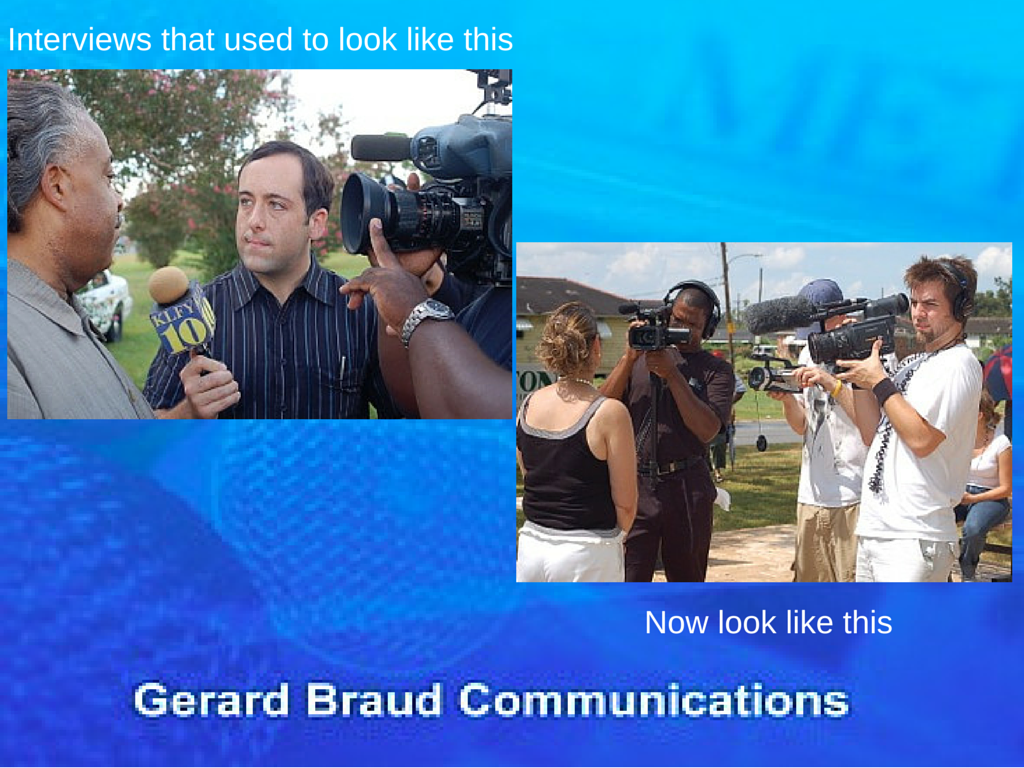
Interviews

Not too long ago a typical network news crew had five people. A typical local television or print crew had a reporter and photographer. Today, newspapers and television stations alike expect a single person to be both the reporter and photographer.


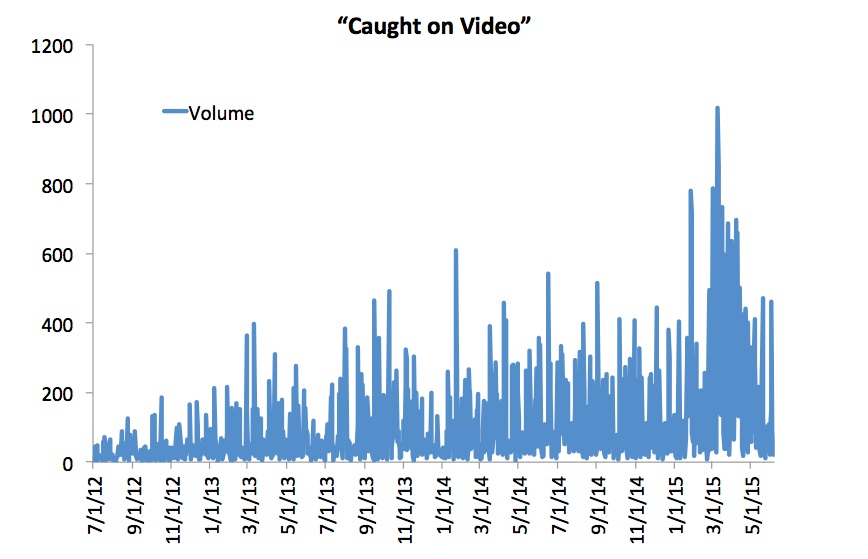
2) The “Caught on Video” craze.

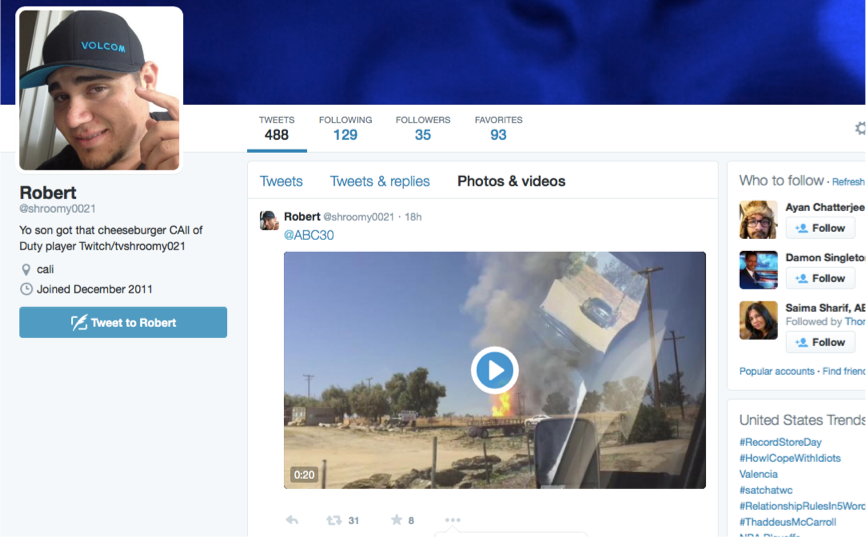
PastedGraphic-2With fewer employees to gather the news, the media depend upon videos submitted by eyewitnesses. The media save a lot of money by not having to chase the news and by letting the news come to them. However, verifying authenticity and facts is a problem. The old rule of, “consider the source,” seems to have gone out the window.

9866FC2E-26CB-4F4A-9366-0079E19FDD8E[1]

caughtonvideoStatistics provided by IQ Media show that in the past three years, there has been a monumental jump in the number of times the phrase “caught on video” is said on television broadcasts.


3) Substituting Trending for NewsPastedGraphic-3

Virtually every television news cast and every media website feature a segment about what is trending. This means that television airtime and web space are being filled with fluff provided by social media, rather than news gathered by professionals.

Statistics provided by IQ Media show that in the past three years, there has been a monumental jump in the number of times the phrase “trending” is said on television broadcasts.

trending


4) Judgment Day is Everyday

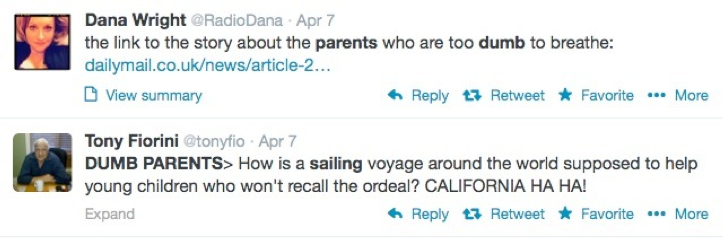
The media have also substituted real news with social media comments from people who judge other people. A perfect example is the condemnation after the U.S. Navy rescued a family from their sinking sailboat on April 6, 2014. The parents had a small child on board and social media lit up with mean comments, which made up a huge part of the news coverage.

PastedGraphic-8


5) Pretend In-Depth Coverage

CNN looked foolish with their all-in attempt to cover the Malaysia 370 plane disappearance. Non-stop coverage of a single issue means fewer employees are needed than if your network covered a variety of issues affecting the lives of viewers.


6) Fake Breaking News

Combined with the pretend in-depth coverage is fake breaking news. The television media have a need to put up a banner across the screen each time they learn one new detail, regardless of how silly it is.

PastedGraphic-4 PastedGraphic-5


Among the many crazy things that CNN called “breaking news” in the Malaysia 370 story, is first breaking the news that the final words from the crew were, “Alright, good night.” The next day it was “breaking news” that the final words were, “Good night Malaysia three seven zero.”

Really CNN? In my time as a journalist we would have called that an error and a correction.

Statistics provided by IQ Media show that in the past three years, there has been a monumental jump in the number of times the phrase “breaking news” is said on television broadcasts.

PastedGraphic-6


Solutions to Media Changes

Among the many solutions we discussed, is the need to recognize that in the future, the media will expect you to provide video from any crisis experienced by your company, as well as a narrative. They will expect you to do a selfie style video directly from the scene.

Such videos are hard to do and require training and practice. While the interactive portion of our workshop taught some of the basic skills, the online 23-part tutorial will teach you even more.

Social Media Collides With Mainstream Media: The Changing Landscape of Media Interviews in Good Times & Bad

By Gerard Braud

InterviewsAs social media and smart phones expand their reach, we are seeing a seismic shift that is sending tremors through the mainstream media landscape. This is creating both new challenges, as well as new opportunities for media spokespeople. Capitalizing on the opportunities requires you to adopt new approaches, learn new skills and be open to new realities.

If you are bold enough and brave enough to try something drastically new, then I’d love to meet you at the upcoming World Conference for the International Association of Business Communications in San Francisco. I’ve prepared an all-new special presentation for Monday, June 15 from 10:30 a.m. – 12:30 p.m. in the Club Room. It only seats 100 people, so make plans to get their early.

This is not a lecture or a class but a do-and-learn workshop. You should come ready to write in the first hour, as well as to discuss the challenges you and/or your spokespeople have faced in previous media training classes or in previous interviews. If there is a problem, the first hour is dedicated to solving those problems so they never happen again. In fact, I’m ready for you to contact me outlining problems you’ve faced that you’d like to solve. Send an e-mail to me at gerard@braudcommunications.com with the subject line IABC Question.

Our focus in the first hour will include:

  • Discovering why the media landscape is changing
  • Learning the 4 things you must be ready to say in every interview
  • Rethinking your approach to media training

In the second hour you will be up on your feet unlocking the futuristic power of your smartphone, learning how to do remote interviews. Please make sure to bring either your smartphone or your iPad.

While many spokespeople complain about how the media operate, the reality is that you can learn to be an expert every time either you or an executive within your business speaks to the media.

Social media is one of the biggest trends changing the media. Free content is competing with professional content. The reality is news stories are being told by eyewitnesses with a smartphone faster than the story can be told by the mainstream media and faster than a corporation might be willing to tell the story of their own crisis.

As social media grabs more of the media’s audience, the media are watching their profits disappear. That means there are fewer reporters and photographers employed to tell your corporate story in good times and in times of crisis.

Where problems exist in the media we hope you see opportunities.

The greatest opportunity for someone who is a professional business communicator or public relations expert is, on one hand, to improve your own interview skills, and at the same time, learn new skills for doing interviews and creating videos that are as good as or better than the ones being supplied by eyewitnesses.

If you crave a chance to walk away with new skills that you can immediately use as soon as you are back at work, I look forward to meeting you at this workshop.


Tutorial #2 Lessons from Game Changing Crisis Communications for Hurricane Season

Tutorial #2 by Gerard Braud, iReporter Evangelist

With hurricane season upon us, and other violent weather such as floods, hail, and tornadoes hitting much of the United States this time of year, we are focusing on how to effectively use video to communicate in a crisis. Today’s lesson stems from what we learned eight years ago about the power of video, especially when it is uploaded directly to CNN as an iReport.

Tutorial #2 Still image Gerard Braud

Click image to watch video

Think back to April 16, 2007, the day of the Virginia Tech massacre. Thirty-two people were murdered. The image that may stand out the most for you would have been a cell phone videos, shot by a student, capturing the sounds of gunshots.

The student shot the video, then uploaded it as a CNN iReport.

This was the moment, for me, that the world of news coverage and crisis communications changed.

You can watch today’s tutorial video to learn more.

I’ve worn and still do, wear many hats. My primary job is as a crisis communications expert, teaching organizations how to effectively communicate with the media, their employees and other key audiences during a crisis. I also worked for 15 years as a full-time journalist. And occasionally, I’m a citizen journalist, filing CNN iReports.

From a crisis communications standpoint, Virginia Tech failed to effectively communicate with the media, their students, their faculty, and many other audiences on the day of their massacre.

Furthermore, had they communicated properly and evacuated the campus in a timely manner, that student would have not been on campus with his cellphone, and therefore would not have captured that video, and therefore would not have been able to sent it to CNN, and therefore the media would never have had the video.

At the same time, had the university’s own public relations team been aware of the power of a CNN iReport, they could have actually provided their own statement directly to CNN by filing an iReport.

This entire sequence of events was a game changer. It signified to all public relations people, to all spokespeople, and to all Public Information Officers, that someone is going to tell your story. It can either be you, as a professional with official and accurate information, or the story will be told by an eyewitness with a smart phone.

Yet here we are in 2013, six years later, and I’d be willing to be the vast majority of public relations people and Public Information Officers (PIO) have never given it a second thought. I’d bet most people do not have an idea how to do this? I know this to be true because when I suggest it in the workshops I teach, a portion of the class is amazed that they’ve never thought of it. Another portion can only make up reasons as to why they think their boss will reject the idea, admitting that they do not have the tenacity to stand up to the boss and make a strong, legitimate case for why web videos need to be an important part of their crisis communication and media relations plan.

Who do you want telling your story during your crisis?

This link will take you to my tutorials on the CNN iReporter website. I hope you take the time to view, study, and share all 23 videos and articles.

This link will take you to the index for all of the articles and videos.

If you, like many others, think this information would be valuable as a workshop at a conference or corporate meeting, please call me at 985-624-9976. You can also download a PDF of the program description: Social Media iReports.pdf, so you can share it with your meeting planner or training manager.
4 Tips to Avoid the Worst Sentence in a News Release

wall-1312336_1920By Gerard Braud

The worst sentence to begin a news release is, “We are excited to announce…”

If you hire a so-called public relations expert to write your news release and they write this, you should fire them. If you have written this yourself because you’ve seen others do the same thing, please stop.

Nothing says you value yourself more than your audience or customers than the dreaded, “We are excited” sentence.

In the world of customer satisfaction, your goal should be to celebrate the joy and benefits that you bring to your customers.

Here are 4 tips to avoid the worst sentence in the world:

1. Stop writing it.

2. Begin your news release with a customer-focused sentence, such as, “If you need XYZ, your life is about to get easier because of a new product/gadget being introduced today.”

3. Measure your “I”/”we”/”you”/”them” use. Your news release should contain more sentences that focus on the customer than the company.

4. Measure your “how” to “why” use. Stop focusing on how your product works and focus on why it improves the lives of your customers.

There is no doubt that the internal decision makers are excited. But the key to better sales is to make the consumer excited. When the customer gets excited they buy. When they buy then you can really get excited.


Photo credit

6 PR Questions: Are You a Rug or a Flying Carpet?

Gerard Braud * 15By Gerard Braud

In your public relations and communications role, which are you? Are you a rug or a flying carpet?

My dream is for you to soar as a PR expert, being both a thought leader and a brilliant, innovative, practitioner of your craft. My fear is that you let the so-called leaders in your company walk all over you, dictating what you can and can’t do.

Here are 6 questions to help you determine the answer, if you don’t know it already:

#1 Do your corporate leaders comprehend the monetary benefit of what you do OR do they see you as a financial burden?

#2 Do you hear “no” so often that you are feeling defeated and underappreciated? OR do you get summoned on a regular basis to serve as strategic council?

#3 Is it hard to focus on your tasks and know what your goals are because your leaders spontaneously throw new tasks at you? OR Do your leaders give you room to develop a communications plan with strategic goals and editorial calendars?

#4 Are you in constant reactive mode to emerging issues and crisis communications? OR do your leaders encourage preparation by having a crisis communications plan tested with crisis communications drills?

#5 When it is time to do a media interview, do you hold your breath fearing what your leaders may blurt out to a reporter? OR do your leaders willingly participate in media training and actively prepare for an interview?

#6 Do your leaders lump together tasks such as marketing, graphic design, internal communications, public relations and social media? OR do they recognize that unique talents and skills are needed to properly master each task?

If you are agreeing with the negative premises above, then you are a rug. You allow your employer to walk all over you. You are in a low place. You probably hate your job. Chances are you need to hire a headhunter and find a new job.

If you are agreeing with the positive premises above, then you are a flying carpet who can soar in your career. The sky is the limit. Life is good and rewards will follow.

Life is too short to be unhappy. The decision to control your happiness should be in your hands and not the hands of someone else.

4 Media Training Tips from Marco Rubio’s Interview with Chris Wallace

Marco rubio interviewBy Gerard Braud

I’m irritated by how Chris Wallace conducted his interview with Marco Rubio on Fox News Sunday. The media interview is generating a barrage of news stories about where Rubio stands on the issue of whether the U.S. should have invaded Iraq.

For the full context of this article, watch this clip being used by Rubio’s political opponents. It is an edited three-minute exchange with Chris Wallace, which amounts to a verbal tug of war.

This type of media interview could happen to anyone from a CEO, to a corporate spokesperson, to a political candidate like Rubio. Lightweight media training can never prepare a spokesperson for this type of an interview. High profile people need intense media training at a high level, which requires the trainer to be combative at a high level.

Here are 4 tips for dealing with a tough interview:

Tip 1: Study interviews from others like you who have been asked the same question. Just last week Jeb Bush stumbled on the same question. It appears Rubio studied the Bush interviews and was for the most part prepared to answer the question.

Tip 2: Challenge the reporter’s question when you don’t understand the question. I suggested this in my Jeb Bush article, and to his credit, Rubio did this, saying to Wallace at one point, “I don’t understand the question you are asking.”

Tip 3: Shut up and listen. When a reporter gets combative, as Wallace did, you have to decide when you are going to talk and when you are going to listen. At some point you must realize that when two people are talking over each other a lot of valuable airtime is being wasted on the verbal tug of war. As the guest, sometimes you need to listen to the reporter’s question and wait for him or her to finish before refining your answer. Wallace kept asking the vague question, “Was it a mistake to go to war in Iraq?” Rubio kept arguing over the semantics of the question.

Tip 4: When you’ve practiced your answers, as it appears Rubio has done, deliver the answer perfectly without feeling compelled to insert a spontaneous thought or verbal ad lib. My review of the interview shows that Rubio has a consistent set of answers to this question. In a nutshell, he has said that he would have invaded if he had been handed flawed information and that it would have been a mistake to invade if he had known the true facts. But in an attempt to end the verbal tug of war with Wallace, Rubio adlibs, “Based on what we know now I wouldn’t have thought Manny Pacquiao was going to get beat in that fight a few weeks ago…”

Ultimately, because of Wallace’s constant interruptions, Rubio would have needed to let Wallace finish and then answer with his rehearsed answer stated clearly, with parsed words, and delivered with as few words as possible. Such an answer sometimes requires the spokesperson to include their version of the question and answer for context, such as:

If the question is. ‘Do I support the decision to invade Iraq?’ my answer comes in two parts:

Part 1 – “If I had been given the same flawed information as President, I might have made the same flawed decision to invade.”

Part 2 – “If I had been given accurate information based on what we know now, I suspect that no president would have invaded at that time for those reasons.”

In conclusion, preparation for a potentially combative interview requires a high level of preparation and perfection, which requires extra training and practice.