Learning to properly shoot smartphone videos as part of your crisis communications and media relations strategy is a skill every corporate spokesperson, Public Information Officer (PIO), or public relations professional should practice and perfect. You will want to also include training for your emergency manager who heads your emergency operations center. It is crucial to practice where to look and how to hold your device in order to create a professional looking video. This can be extremely difficult during your crisis, and should be practiced on a clear sunny day when you are not under the pressure of a natural disaster, hurricane, or other crisis event.
If you are recording yourself, your eyes are drawn to the screen, because you see yourself. But to produce a great web video or CNN iReport, you have to avoid looking at yourself on the screen and instead, look at the camera.
This is one of the most unnatural experiences you will ever have. The camera is so small… barely a dot on the side of the device. It is so much easier to look at a big video camera lens. With a big lens, you can usually see your reflection. Not so with that little dot of a lens on your iPhone, iPad or computer.
So here is what you must do — you must take out your smart device of choice, then shoot a video of yourself and then watch it.
If you, like many others, think this information would be valuable as a workshop at a conference or corporate meeting, please call me at 985-624-9976. You can also download a PDF that outlines the program, Social Media iReports.pdf, so you can share it with your meeting planner or training manager.
https://braudcommunications.com/wp-content/uploads/2020/12/Logo-white-01-300x138.png00gbraudhttps://braudcommunications.com/wp-content/uploads/2020/12/Logo-white-01-300x138.pnggbraud2015-06-19 03:00:062021-05-20 01:41:39Tutorial #11: Where to Look When Using Your iPhone or iPad for a Smartphone Selfie Video
When making smartphone videos or CNN iReports, you need to plan your storytelling. Whether you are communicating as a public relations spokesperson, a Public Information Officer (PIO) for a federal or state agency, or for state, county or local government, it is crucial to manage the expectations of your audience. Predetermining and planning your storytelling may not seem like an easy task when it comes to hurricane season or natural disasters, but in this tutorial you will learn to do exactly what I’ve done in the past.
Click image to watch video
As you watch television news, especially live cable news and live breaking news in a crisis, observe the questions from the news reporters, news anchors and members of the media. They want to know how much worse will the event get?
If you recognize this, you can make this a part of your planned story telling,
During Hurricane Isaac, my goal was to manage the expectations of the national audience and the national media so they would know just how bad things would get. For the most part, it was all predictable for me, because I had been to and reported on so many hurricanes during my career as a television reporter. As a resident of Mandeville, Louisiana and as someone born in New Orleans, I had a pretty good idea of what was to come. (Although the 4 10-food alligators, the 50 dead nutria and the thousands of snakes were a surprise.)
Take a look at today’s tutorial to learn more about this, and view some of my Hurricane Isaac CNN iReports to observe what I did.
Electric utility companies are a perfect example of the kind of company that should build their media training and crisis communications strategy around managing the expectations of their audience. Some people in New Orleans were very mad at Entergy of New Orleans when the electric company didn’t have electricity restored to all of their customers on the day following the hurricane. The angry citizens called the media and complained non-stop on social media. Although all were without electricity after Hurricane Katrina, they expected faster restoration after Isaac, which was a Category 1 hurricane. Additionally, restoration to 99% of the customers may be great, but the 1% without power can still cause a public relations problem for a company.
To their credit, Entergy was holding news briefings and using social media where possible. But here is what I would like to see every investor owned utility and every Rural Electric Cooperative (Co-op) say to their customers before any big, predictable weather event:
“This storm will disrupt electrical service. You may lose electricity early as trees fall on power lines or as winds blow power lines down. Your home may survivor the storm, but in the days immediately after the storm, you may be very miserable. You won’t be able to turn on any lights. You won’t be able to cook on electric stoves. If you have an electric hot water heater, you may not have hot water. Your air conditioning (or heating) may not work. And while our electric crews and those from other communities will begin restoring power quickly, we cannot say when everyone will have their lights back on. Furthermore, if the electric meter to your home is damaged or if the electrical wiring in your home gets wet or damaged, it may be weeks or months before your power can be restored. So for that reason, we suggest you follow the advice of your local government and evacuate to an area outside of the predicted disaster zone, then return home when you can once again have modern conveniences.”
That type of statement a) tells it to the audience straight without any public relations B.S., 2) it manages their expectation for how bad things may get, and 3) it gives them a clear reason as to why they should evacuate — because many people are in denial about whether or not the wind or flooding will harm them, but they don’t want to be miserable and without creature comforts.
State, county and city governments can also benefit from this approach. Often government will call for an evacuation for public safety. Many people don’t want to evacuate because a previous hurricane did not significantly impact them. But government should emphasize that no two storms are alike and that a zone that survived one hurricane might be destroyed by the path of another storm. Government public information officers and spokespeople should also emphasize the loss of creature comforts associated with the loss of electricity, water, operating toilets, the inability to cook or buy supplies.
To continue to manage the expectations of the audience before, during and after an event, any corporation or government agency, can do exactly what I did as a citizen — they can create a CNN iReport account and file multiple iReport videos just as I did.
If you, like many others, think this information would be valuable as a workshop at a conference or corporate meeting, please call me at 985-624-9976. You can also download a PDF that outlines the program, Social Media iReports.pdf so you can share it with your meeting planner or training manager.
https://braudcommunications.com/wp-content/uploads/2020/12/Logo-white-01-300x138.png00gbraudhttps://braudcommunications.com/wp-content/uploads/2020/12/Logo-white-01-300x138.pnggbraud2015-06-18 03:00:402021-05-20 01:42:13Tutorial #10 How to Manage the Expectations of Your Audience When Shooting Smartphone Videos During Your Crisis
For those of you who attended the workshop, this blog will be part of the continuing education program you were promised. For those who missed the workshop, this will help you learn what the group learned. For those of you who would like a similar workshop for your chapter or professional association, please contact me at gerard@braudcommunications.com.
Before the teach-back segment, here are links to the two additional free training modules I offered to everyone:
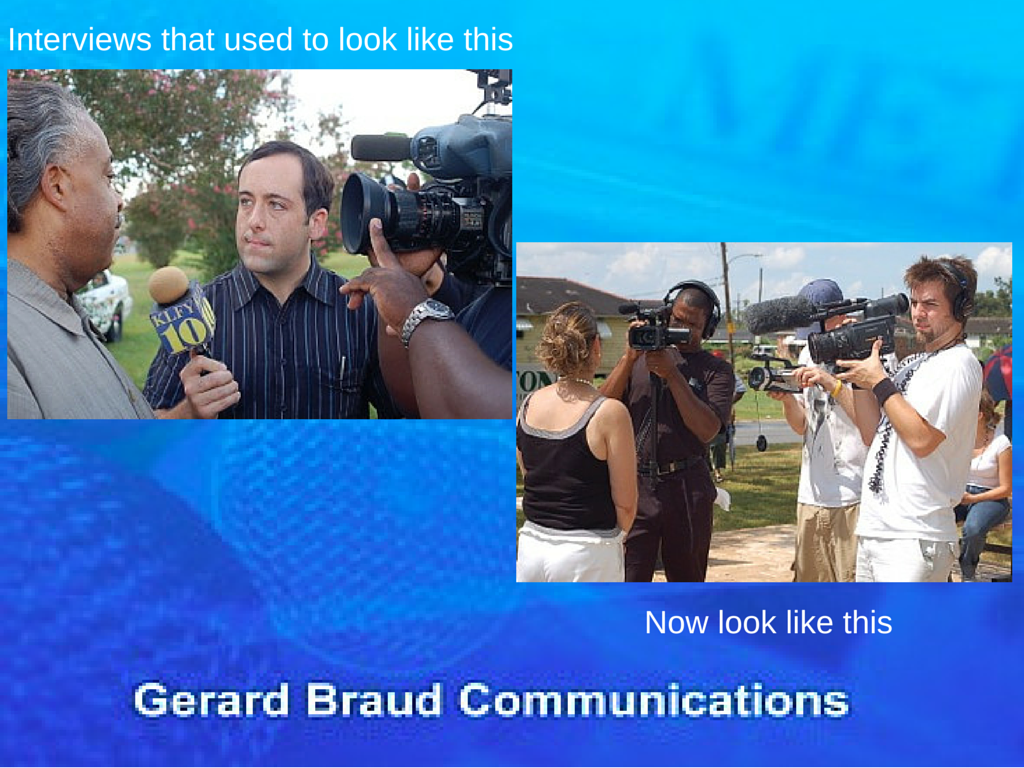
1) Reduced staffs, i.e. fewer reporters, photographers and journalists to tell your story.
Not too long ago a typical network news crew had five people. A typical local television or print crew had a reporter and photographer. Today, newspapers and television stations alike expect a single person to be both the reporter and photographer.
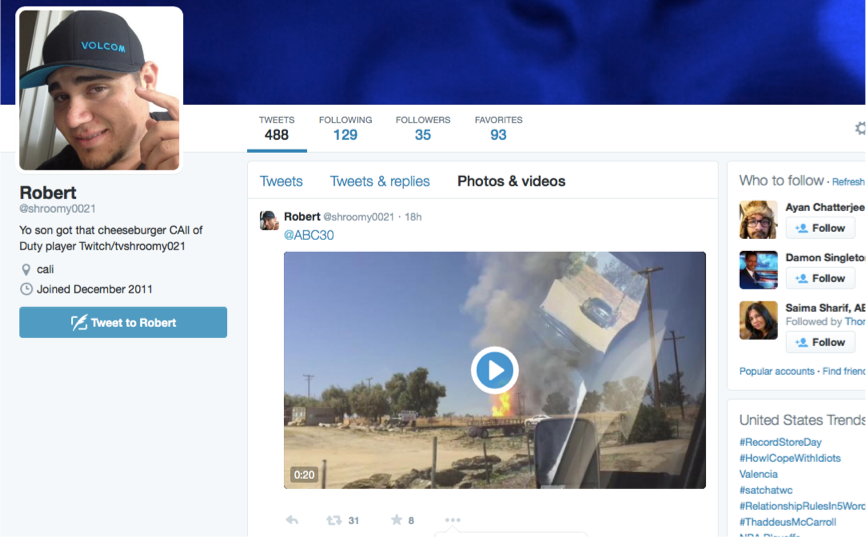
2) The “Caught on Video” craze.
With fewer employees to gather the news, the media depend upon videos submitted by eyewitnesses. The media save a lot of money by not having to chase the news and by letting the news come to them. However, verifying authenticity and facts is a problem. The old rule of, “consider the source,” seems to have gone out the window.
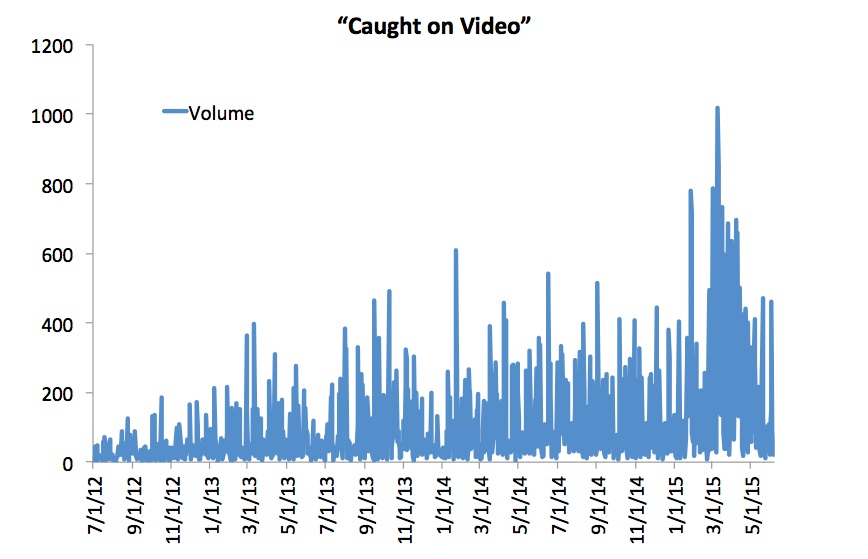
Statistics provided by IQ Media show that in the past three years, there has been a monumental jump in the number of times the phrase “caught on video” is said on television broadcasts.
3) Substituting Trending for News
Virtually every television news cast and every media website feature a segment about what is trending. This means that television airtime and web space are being filled with fluff provided by social media, rather than news gathered by professionals.
Statistics provided by IQ Media show that in the past three years, there has been a monumental jump in the number of times the phrase “trending” is said on television broadcasts.
4) Judgment Day is Everyday
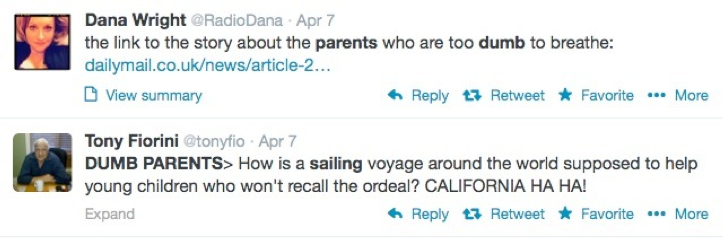
The media have also substituted real news with social media comments from people who judge other people. A perfect example is the condemnation after the U.S. Navy rescued a family from their sinking sailboat on April 6, 2014. The parents had a small child on board and social media lit up with mean comments, which made up a huge part of the news coverage.
5) Pretend In-Depth Coverage
CNN looked foolish with their all-in attempt to cover the Malaysia 370 plane disappearance. Non-stop coverage of a single issue means fewer employees are needed than if your network covered a variety of issues affecting the lives of viewers.
6) Fake Breaking News
Combined with the pretend in-depth coverage is fake breaking news. The television media have a need to put up a banner across the screen each time they learn one new detail, regardless of how silly it is.
Among the many crazy things that CNN called “breaking news” in the Malaysia 370 story, is first breaking the news that the final words from the crew were, “Alright, good night.” The next day it was “breaking news” that the final words were, “Good night Malaysia three seven zero.”
Really CNN? In my time as a journalist we would have called that an error and a correction.
Statistics provided by IQ Media show that in the past three years, there has been a monumental jump in the number of times the phrase “breaking news” is said on television broadcasts.
Solutions to Media Changes
Among the many solutions we discussed, is the need to recognize that in the future, the media will expect you to provide video from any crisis experienced by your company, as well as a narrative. They will expect you to do a selfie style video directly from the scene.
Such videos are hard to do and require training and practice. While the interactive portion of our workshop taught some of the basic skills, the online 23-part tutorial will teach you even more.
https://braudcommunications.com/wp-content/uploads/2020/12/Logo-white-01-300x138.png00gbraudhttps://braudcommunications.com/wp-content/uploads/2020/12/Logo-white-01-300x138.pnggbraud2015-06-17 15:25:462021-05-20 01:42:347 Frightening Media Realities for Public Relations
This tutorial is part of a series of articles posted in the month of June that explain how to be a good iReporter and how to make CNN iReports, or smartphone videos a vital part of your crisis communication and media relations strategy. The tutorials are more relevant than ever in the month of June due to hurricane season. Make sure to plan and practice what to say in your videos on a clear sunny day, in order to be prepared on your darkest day. In this particular tutorial, I walk you through the steps of what to say on video and directly to the media in regards to your crisis.
Click image to watch video
Talking is easy, but saying the right thing is hard. Media training classes often expose who talks too much and says the wrong things and who knows how to practice and choose their words carefully.
Unlike a normal media interview, in which you might be asked hard questions or face the wrath of someone who edits your statements, when you file an iReport you, your mouth and your video are your first line of editing. You are shooting a short video and do-overs are allowed if you say the wrong thing or mess up — that’s the good news. The bad news is, if you are not careful you will be too critical of what you say and keep doing do-overs.
You can watch my iReports and analyze what I say. During my Hurricane Isaac videos in 2013, most of the time I start by saying, “This is Gerard Braud in Mandeville, Louisiana. Today is (give date) and the time is (give time). Hurricane Isaac is coming ashore. Winds are (give details). So far we’ve had xx inches of rain.” I then narrate what is most news worthy at that moment.
If you break down my first :15 seconds, it goes like this:
1) Who? – Gerard Braud
2) What? – Hurricane Isaac
3) When? – Date and time given
4) Where? – Mandeville, LA
5) Why? – Explain what is news worthy
6) How? or How Much? – Rain and wind updates
My narration of what is most news worthy begins with a major statement that is designed to serve as a headline or summation of what I am about to share. In journalism, we call this the inverted pyramid. You begin broad and you built to the details. Think of a traditional newspaper, which has a headline at the top, then a summary statement, then more details.
With that in mind, my report may go on to say, “At his time, flood waters have overtopped the sea wall and there are now white caps rolling down my driveway. The waves are beginning to cause damage to my storage area and tool shed. There is a good chance my tool shed will wash away.”
A dissection of that statement would go like this:
1) Headline: Flooding
2) Broad detail: White caps
3) More details: Tool shed washing away
I like to call my style of iReporting a 1-2-3 A-B-C approach. In
other words, if “A” happens, then “B” will be the next thing to happen, then “C” happens. Hence:
A) Flooding
B) White caps
3) Damage from waves
The biggest mistake you can make is to give too many details, followed by talking too long. Look at it this way: When you read a story in the newspaper, do you read the entire article and value the details at the end of the story, or do you generally read the headline and the summation sentence, then move on? Most people never read the entire story. Here is another test: When you watch an online or YouTube video, how long do you watch before you get tired of it? When you watch video online, do you watch for deep information or do you primarily watch for entertainment?
This entire process is easy and intuitive for me because I started learning all of this in 1976. I did it everyday as a television reporter for 15 years, through a career with an enormous number of live reports.
But if you haven’t done this a lot and if this does not come natural to you, then you must practice, practice, practice.
You cannot and will not be instantly successful on your first try. You’ll be even worse if you are trying to do this for the first time in a middle of a crisis.
In many respects, your training needs to combine some media training skills and a significant amount of video production skills. In some cases you may have someone shooting the video for you with a video camera or smart device. In my iReports, I am the videographer using an iPhone or iPad.
If you need help with your training or if you would like to have this content shared as part of a workshop or conference presentation, please contact me at gerard@braudcommunications.com
https://braudcommunications.com/wp-content/uploads/2020/12/Logo-white-01-300x138.png00gbraudhttps://braudcommunications.com/wp-content/uploads/2020/12/Logo-white-01-300x138.pnggbraud2015-06-17 03:00:122021-05-20 01:42:56Tutorial #9: Smartphone Videos for Crisis Communications Start by Saying the Right Thing
As mentioned in all my tutorials this month, my goal for you, if you are a spokesperson, public relations expert, or Public Information Officer (PIO) for a government agency, is to make iReports part of your crisis communication and media relations plan. Now I’m asking you to think in terms of telling compare and contrast stories, especially during hurricane season or your natural disaster. Here is why:
Think about when you watch television news. If there is a natural disaster, in order for you to appreciate the magnitude of the disaster, don’t you really need to know what things looked like before the disaster?
The best stories are told when the audience can see before, during and after an event.
I want this to always be your goal when you file your CNN iReports. This means not just filing one report, but filing several.
During Hurricane Isaac in 2012, as it impacted my home in Mandeville, Louisiana, 30 miles north of New Orleans, I filed CNN iReports for five days.
My first report was on a clear sunny afternoon, as I told the audience how Lake Pontchartrain would flood portions of the community. You can watch that original video here.
The next day, I filed several more iReports as the storm moved in, and specifically, as Lake Pontchartrain caused flooding, just as I had predicted in the previous video.
This link will take you to the index for all of the articles and videos.
If you, like many others, think this information would be valuable as a workshop at a conference or corporate meeting, please call me at 985-624-9976. You can also download a PDF that outlines the program, Social Media iReports.pdf so you can share it with your meeting planner or training manager.
https://braudcommunications.com/wp-content/uploads/2020/12/Logo-white-01-300x138.png00gbraudhttps://braudcommunications.com/wp-content/uploads/2020/12/Logo-white-01-300x138.pnggbraud2015-06-16 03:00:202021-05-20 01:43:17Tutorial #8: Telling Compare and Contrast Stories to the Media During Hurricane Season
This month when you visit this blog, you will learn secrets about how and why you should be crazy about iReports and using smart phones and tablets to broadcast to the world. In this blog in particular, you can learn how you can be the source of breaking news during hurricane season, during a natural disaster, or any of the crises you face. You can be the official spokesperson to the media on behalf of your organization, rather than speculating eyewitnesses on the street.
Click to watch video
Out of all of the people that CNN could put on television, why would they pick you? What can you share that is newsworthy?
This is an important question to ask. The answer may be easier to understand when I explain how and why I became the guy who was broadcasting live from my front porch during Hurricane Isaac in 2012.
Over the next few days you will learn the background story of how I was selected by CNN.
With 7 feet of floodwater surrounding my home and no electricity for 5 days during Hurricane Isaac, I was able to broadcast live to CNN using only my iPhone, G3 and Skype. Amid the rain, heat, waves, snakes, alligators, debris and dead animal carcasses, I kept broadcasting.
Because of the reports I filed from August 26-September 2, 2012, CNN producers chose my reports out of all the reports filed by 11,000 iReporters in 2012, to be recognized for continuing coverage of breaking news. The reports were seen both on the CNN iReport website and they were broadcast by CNN and HLN to viewers around the world.
These reports took viewers into places that even CNN news crews couldn’t reach with their million dollar satellite trucks and $60,000 HD cameras.
I have been a CNN iReport evangelist since the program began. During 4 major weather events my iReports have been broadcast on CNN and on multiple occasions have lead to live broadcasts.
The first time was when I witnessed a funnel cloud during Hurricane Gilbert. I simply uploaded a short video with no narration to iReports. CNN showed it, then my phone range. A friend in California called to warn me there were tornadoes near me and he had just seen it on CNN. Ha. Funny how that worked.
On December 11, 2010 we had an unusual 5 inch snow fall in the town I live in, near New Orleans. I had not sent out Christmas cards yet, so with my point and shoot camera I produced a short news video about the snow, then wished everyone Merry Christmas. I uploaded the video to iReports. Their producers vetted the report and confirmed it was real. They edited off my Christmas greeting, then used the rest of the video all day long to run before every weather report. That was really cool.
CNN asked me to do a live report via Skype, but that got canceled because of breaking news. That was the day the body of Caylee Anthony was found in the woods, leading to the murder trial of the child’s mother, Casey Anthony.
Click image to watch video
In August of 2011, Tropical Storm Lee came through New Orleans and my little town of Mandeville, LA. A week before, I had moved into a new house on the shore of Lake Pontchartrain. The storm surge filled my yard with 5 feet of water. Using my iPad and Wi-Fi, I shot a 90 second news report, then uploaded it to iReports. Within minutes, producers were asking me to do live reports. So with an iPad as my broadcast camera and Wi-Fi as my broadcast channel, I was on the air for 2 days.
These 3 events set the stage for Hurricane Isaac in August 2012 and the series of reports for which I was nominated. You will learn more details in our next article.
This link will take you to the index for all of the articles and videos.
If you, like many others, think this information would be valuable as a workshop at a conference or corporate meeting, please call me at 985-624-9976. You can also download a PDF that outlines the program: Social Media iReports.pdf, so you can share it with your meeting planner or training manager.
https://braudcommunications.com/wp-content/uploads/2020/12/Logo-white-01-300x138.png00gbraudhttps://braudcommunications.com/wp-content/uploads/2020/12/Logo-white-01-300x138.pnggbraud2015-06-15 03:00:512021-05-20 01:43:43Tutorial #7 How You Can Be the Source of Breaking News During Hurricane Season
Tutorial #5 By CNN iReporter Evangelist Gerard Braud —
So far this month, we have reviewed why you should be a CNN iReporter, or at the very least why you should learn to effectively shoot your own smartphone videos. We have learned how to set up your CNN iReporter account and how to determine what is newsworthy and what isn’t. Now it is time to learn exactly how to effectively communicate through video on your darkest, stormiest day. Here are a few lessons for telling the story of your organization’s crisis, ranging from natural disasters to tragic events like workplace shootings. As with our previous lessons, this one is also based on my video documentation of Hurricane Isaac in 2012. Enjoy!
Click here to watch video
It is important to evacuate when an approaching hurricane is going to be a bad one. Staying in your home in destructive winds and killer flooding is dumb. Hurricane Isaac was not a strong storm and mandatory evacuations were not called. So, I decided to stay in my home on the shore of Lake Pontchartrain in Mandeville, LA, which is 30 minutes north of New Orleans. The storm winds at the eye of the hurricane were just over 75 miles per hour, making it barely a Category 1 hurricane. The eye was forecast to pass 50 miles to the west of me, which meant the winds would not be destructive where I was. The path would push water from the Gulf of Mexico into Lake Pontchartrain, resulting in localized flooding from storm surge.
As an experienced storm chaser, my goal was to document the hurricane, from the preparation stage, through the flooding, then through the aftermath and cleanup.
My home is a small cottage, raised on steel 10-foot pilings, with steel beams. Below my house is a carport and storage area that is 5 feet above sea level. That places the floor of my living quarters 15 feet above sea level and makes for a great perch to view mother nature. The storage area is constructed with mandatory breakaway walls, which will wash away in a storm, and they did.
Two days before the hurricane I began to document the flurry of activities and preparations in the community. There were long lines at the gas stations until every pump ran dry. I documented empty grocery store shelves, as water and canned goods were snatched up. At the hardware store I documented long lines as people purchased electrical generators and filled propane tanks.
On Tuesday, August 28, 2012, the evening before the storm made landfall, I filed an iReport that showed a calm lake, a green parkway and the green grass in my yard. I explained to viewers that the next day the entire area would be underwater, which all came to pass and made for a great follow up report. That was the iReport that lead CNN Headline News (HLN) producers to ask me to do a live report on Evening Express as the hurricane made landfall on August 29. By then, electrical power had gone out and I was broadcasting live using my iPhone 4, a G3 phone signal, and Skype
The big surprise with Hurricane Isaac was that the storm stalled and stayed in the same place for nearly 2 days, all the while causing the floodwaters to get higher. A fast moving storm would have come and gone in 12 hours. This one would cause flooding from Tuesday until Sunday.
By the time we hit the air live on Evening Express on the evening of August 29, there were whitecaps rolling down my driveway. After dark I did a live report for the Dr. Drew Show. Shortly after I signed off with Dr. Drew around 9 p.m., I began to hear strange creaking noises in the house. Occasionally there were unnerving vibrations. When I turned on the faucet there was no water. This wasn’t good. #understatement. I grabbed a flashlight and walked downstairs, where I could see that the breakaway walls in the storage areas on my carport began to wash out. As they did, debris in the waves broke the water supply, leaving me without running water. Then I realized that near the water pipes were natural gas lines. #causeforconcern
I phoned a neighbor and asked if I could sleep at his house just in case mine had a gas leak. I shut off all of my pilot lights, blew out all of my hurricane lanterns and candles, grabbed my life vest and paddled my canoe to his house. By this time, the water was so deep I simply paddled over my fence.
Overnight, the eye of the storm began to move again. The morning of August 30th I paddled home to find there was no gas leak, so I filed more iReports showing the damage as the water level dropped some.
I was surprised at how much debris had washed into my yard. Then nature revealed unwanted guests. First, there were 10 alligators swimming in my yard. As it got warm, dead nutria, a large swamp rat the size of a large muskrat, began popping up out of the water. I counted 50 carcasses. As the water drained off further, it revealed a blanket of swamp grass 12-24 inches deep, filled with thousands of snakes. I felt like I was in an Indiana Jones movie. Such anomalies mean just one thing: file more iReports and do more live reports for Evening Express and Dr. Drew.
For me, the beauty of iReports is the ability of ordinary people to take their stories right to the world’s leading news network. News happens fast and there isn’t always a professional news crew present to capture it. A citizen with an iPhone can capture and report the news even when no news crews are around.
What people who work in public relations need to be aware of is that you too, have the ability to be an iReporter. If you fail to do so, your story will be told by a citizen on the street, who may have great pictures, but not always the correct information. This is true for all spokespeople. This is true for Public Information Officers (PIO).
https://braudcommunications.com/wp-content/uploads/2020/12/Logo-white-01-300x138.png00gbraudhttps://braudcommunications.com/wp-content/uploads/2020/12/Logo-white-01-300x138.pnggbraud2015-06-11 03:00:592021-05-20 01:46:10Tutorial #5: Hurricane Season Crisis Communications Lessons from Hurricane Isaac
As social media and smart phones expand their reach, we are seeing a seismic shift that is sending tremors through the mainstream media landscape. This is creating both new challenges, as well as new opportunities for media spokespeople. Capitalizing on the opportunities requires you to adopt new approaches, learn new skills and be open to new realities.
If you are bold enough and brave enough to try something drastically new, then I’d love to meet you at the upcoming World Conference for the International Association of Business Communications in San Francisco. I’ve prepared an all-new special presentation for Monday, June 15 from 10:30 a.m. – 12:30 p.m. in the Club Room. It only seats 100 people, so make plans to get their early.
This is not a lecture or a class but a do-and-learn workshop. You should come ready to write in the first hour, as well as to discuss the challenges you and/or your spokespeople have faced in previous media training classes or in previous interviews. If there is a problem, the first hour is dedicated to solving those problems so they never happen again. In fact, I’m ready for you to contact me outlining problems you’ve faced that you’d like to solve. Send an e-mail to me at gerard@braudcommunications.com with the subject line IABC Question.
Our focus in the first hour will include:
Discovering why the media landscape is changing
Learning the 4 things you must be ready to say in every interview
Rethinking your approach to media training
In the second hour you will be up on your feet unlocking the futuristic power of your smartphone, learning how to do remote interviews. Please make sure to bring either your smartphone or your iPad.
While many spokespeople complain about how the media operate, the reality is that you can learn to be an expert every time either you or an executive within your business speaks to the media.
Social media is one of the biggest trends changing the media. Free content is competing with professional content. The reality is news stories are being told by eyewitnesses with a smartphone faster than the story can be told by the mainstream media and faster than a corporation might be willing to tell the story of their own crisis.
As social media grabs more of the media’s audience, the media are watching their profits disappear. That means there are fewer reporters and photographers employed to tell your corporate story in good times and in times of crisis.
Where problems exist in the media we hope you see opportunities.
The greatest opportunity for someone who is a professional business communicator or public relations expert is, on one hand, to improve your own interview skills, and at the same time, learn new skills for doing interviews and creating videos that are as good as or better than the ones being supplied by eyewitnesses.
If you crave a chance to walk away with new skills that you can immediately use as soon as you are back at work, I look forward to meeting you at this workshop.
https://braudcommunications.com/wp-content/uploads/2020/12/Logo-white-01-300x138.png00gbraudhttps://braudcommunications.com/wp-content/uploads/2020/12/Logo-white-01-300x138.pnggbraud2015-06-10 14:03:072021-05-20 01:47:23Social Media Collides With Mainstream Media: The Changing Landscape of Media Interviews in Good Times & Bad
Tutorial #4 By Gerard Braud, CNN iReporter Evangelist —
Creating and filming your own CNN iReports or smartphone videos is a useful tool for communicating with the media, your employees, your customers, and key stakeholders in your crisis. Not only is it a useful tool during hurricane season, but it is useful during any crisis or natural disaster. However, if you plan to do these videos, it is important to understand what the media consider newsworthy. Often, what you consider newsworthy and what the media consider newsworthy are two different things.
Click here to watch video
For the 15 years that I worked as a reporter in print, radio and mostly television, people questioned me daily about why certain things got in the newspaper or on the air, and why other things did not.
News is traditionally defined as what is new, unique or different. Also, acts that tend to be violent, explosive and bloody often dominate the news, hence the old expression, “If it bleeds it leads,” as in, it leads off the newscast.
News and the decisions about what gets into a newspaper or broadcast on the news, is further based on “who cares?” If it is something people will talk about, i.e., they care, it is more likely to be considered news worthy.
What is considered news worthy and what gets on television today is far different than what was considered news worthy 10-15 years ago. News programs and news networks have shifted more toward what I would consider as “info-tainment.” Information and entertainment is blended together and sometimes it is difficult to separate them, or determine where one ends and the other begins.
A loud mouth television or radio commentator often shouts out an opinion in an entertaining way to a significant segment of the audience and produces a large amount of advertising revenue. This, in my opinion not only represents bias in the media, but is also the blurry line that bleeds from news into info-tainment.
Social media has also impacted news coverage and what gets reported. News was once defined as information designed to inform the electorate, so we could understand public issues and elect good leaders. However, today, more people care about — and the media is more likely to report on — the popularity of a viral video on the internet.
For your purpose, as a public relations professional, spokesperson or Public Information Officer (PIO), if a news worthy event happens where you work, your gut and experience tells you that a certain event is news worthy. What you must decide is whether you will be an active participant in providing official information to the media, or whether you will remain silent and allow the narrative to be told by the citizen on the street, armed with a cell phone.
My hope is that these tutorials encourage you to not only participate, but to also become an iReporter for CNN.
This link will take you to the index for all of the articles and videos.
If you, like many others, think this information would be valuable as a workshop at a conference or corporate meeting, please call me at 985-624-9976. You can also download a PDF that outlines the program, Social Media iReports.pdf, so you can share it with your meeting planner or training manager.
https://braudcommunications.com/wp-content/uploads/2020/12/Logo-white-01-300x138.png00gbraudhttps://braudcommunications.com/wp-content/uploads/2020/12/Logo-white-01-300x138.pnggbraud2015-06-10 03:00:532021-05-20 01:48:37Hurricane Season Tutorial #4: When Shooting Smart Phone Videos Consider “What is News?”
Everyday in June I will be sharing tutorials for effective crisis communications during hurricane season. The lessons apply to tornadoes, floods, blizzards, and other natural disasters. The future of crisis communications is in video, particularly CNN iReports, which allow organizations to tell the story of their crisis to their customers, audiences and key stakeholders, rather than speculating eyewitnesses. When speculating eyewitnesses videotape your crisis on their smartphones and it gets shared across local or even national media, your organizations reputation and revenue suffer.
Click image to watch video
CNN iReports should be added to the crisis communications, media relations and social media tool kit of every corporation, government agency, and non-profit organization in the world. Should your organization experience a significant crisis that gets significant media coverage, iReports are your direct path to adding perspective and official information about your breaking news story.
Just as most of you have established an account at Facebook, YouTube and Twitter, you should have an account pre-established at www.cnn.com/ireport so it is ready to use if you need it. Unlike other social media sites, you will use this one less often.
The set up process is fast and simple. If you have created any online profile in the past you can figure it out and complete the task in 5-10 minutes.
Some leaders and executives may question whether the company needs an iReport account. My philosophy is that if you experience a newsworthy crisis, you have two options. You can either have your story told by an unofficial eyewitness on the street that has an iReport account or you can provide better video, more factual details, and dispel rumors.
Shortly after your video is filed, a team of CNN iReport producers will watch your video. if they like it, they label it as vetted by CNN. The link is then shared with producers for the various CNN news programs. If those producers like it, they may place all or part of the video on the air in their news program. If your video proves that you have great visuals, a compelling perspective and compelling information, expect to get a phone call from CNN producers, asking you to do a live report via Skype, using your computer, smart phone or tablet.
This link will take you to the index for all of the articles and videos.
If you, like many others, think this information would be valuable as a workshop at a conference or corporate meeting, please call me at 985-624-9976. You can also download a PDF that outlines the program, Social Media iReports.pdf, so you can share it with your meeting planner or training manager.
https://braudcommunications.com/wp-content/uploads/2020/12/Logo-white-01-300x138.png00gbraudhttps://braudcommunications.com/wp-content/uploads/2020/12/Logo-white-01-300x138.pnggbraud2015-06-05 03:00:272021-05-20 01:49:10Tutorial #3: How to Plan for Your Next Hurricane on a Clear Sunny Day

 If you are recording yourself, your eyes are drawn to the screen, because you see yourself. But to produce a great web video or CNN iReport, you have to avoid looking at yourself on the screen and instead, look at the camera.
 With fewer employees to gather the news, the media depend upon videos submitted by eyewitnesses. The media save a lot of money by not having to chase the news and by letting the news come to them. However, verifying authenticity and facts is a problem. The old rule of, “consider the source,” seems to have gone out the window.
![9866FC2E-26CB-4F4A-9366-0079E19FDD8E[1]](https://braudcommunications.com/wp-content/uploads/2015/06/9866FC2E-26CB-4F4A-9366-0079E19FDD8E1.png)
 Statistics provided by